The safer shortcut is not to skip video. Cover every relevant file once, review overlapping cameras together, and use searchable audio, visual analysis, and direct source links to decide what requires closer attorney attention.
A single traffic stop can produce hours of footage from body-worn cameras, dashcams, fixed surveillance, drones, and phones. In the Bureau of Justice Statistics’ 2020 survey, 79% of local police officers worked for departments that used body-worn cameras.1 The challenge is no longer whether video exists. It is how to achieve reliable coverage of a large production without forcing counsel to watch the same event serially from every camera.
This workflow starts with a full first pass. It then uses synchronized multi-camera playback, a searchable audio-and-visual index, angle analysis, and report comparison to shorten the time between receiving discovery and understanding what the record actually shows.
Why full-footage coverage still matters
Important evidence is not limited to the central encounter. It may be a quiet statement during a three-hour transport, an officer’s comment after a camera appears to have been turned away, a hand movement visible on only one angle, or a gap between two nominally continuous recordings. A keyword search will not find a fact that was never spoken. A transcript will not show where the officer was looking. A summary may omit the ten seconds that change the meaning of the next minute.
For that reason, the defense team should generally establish human coverage of nearly all relevant footage at least once. That does not require the lead attorney to watch every file alone at normal speed. Review may be supervised and divided, low-activity periods may be accelerated, and overlapping cameras may be watched in one synchronized view. But the process should not quietly assume that an unseen segment is unimportant.
The distinction is between coverage and depth. Coverage tells counsel what exists across the whole production. Depth means replaying material portions at normal speed, separating camera angles, checking the surrounding context, and testing the moment against the rest of the file.
What case law actually requires
No United States Supreme Court decision creates a universal rule that a defense attorney must personally watch every second of every recording. The governing principle is reasonableness: counsel must conduct a reasonable investigation or make a professionally reasonable decision that a particular line of investigation is unnecessary.
Strickland v. Washington
Strategic choices receive deference when they follow adequate investigation. A limitation on investigation must itself rest on reasonable professional judgment.
466 U.S. 668, 690–91 (1984) ↗Rompilla v. Beard
Counsel could not bypass a readily available file they knew the prosecution would use merely because other investigative sources had been unhelpful.
545 U.S. 374, 383–90 (2005) ↗People v. Cyrus
A New York appellate court found ineffective assistance where counsel failed to investigate a disclosed surveillance recording and then proceeded without knowing its contents.
48 A.D.3d 150 (N.Y. App. Div. 2007) ↗Wiggins v. Smith reinforces that courts examine not merely whether counsel called a choice “strategic,” but whether the investigation supporting that choice was reasonable in light of what counsel knew.4 The ABA’s Defense Function standards likewise advise prompt review of relevant information and investigation of the prosecution’s evidence, inconsistencies, impeachment paths, and alternative theories.2 Those standards are aspirational, and Cyrus is jurisdiction-specific, but together they point toward a simple operational lesson: know the evidence before making the strategic choice.
Step 1: Preserve and inventory the production
Keep the received files unchanged and work from review copies. Build a production inventory before substantive review begins. For each item, record:
- Filename, producing agency, officer or device, and file format.
- Duration, embedded timestamp, apparent start time, and time-zone information.
- Whether audio exists and whether the file begins before or after activation.
- Duplicate exports, missing sequences, corrupted media, or referenced-but-absent files.
- Related reports, CAD entries, dispatch audio, photographs, interviews, and exhibits.
This inventory is the chain between discovery and review. It prevents a mislabeled duplicate from becoming a second event and makes an unexplained gap visible before it becomes a trial surprise.
Step 2: Cover the full footage in synchronized multi-camera view
Synchronize recordings by their embedded timestamps and confirm the alignment using shared events: a radio transmission, door closing, emergency light activation, shouted phrase, or other visible and audible landmark. Where clocks conflict, document the offset instead of silently forcing the files into agreement.
Then conduct the first pass with all active cameras visible on one timeline. A four-camera event should not automatically require four completely separate viewings. Synchronized playback lets the reviewer see what each camera captured at the same moment, mark when an angle is obstructed, and identify when one stream continues after another ends.
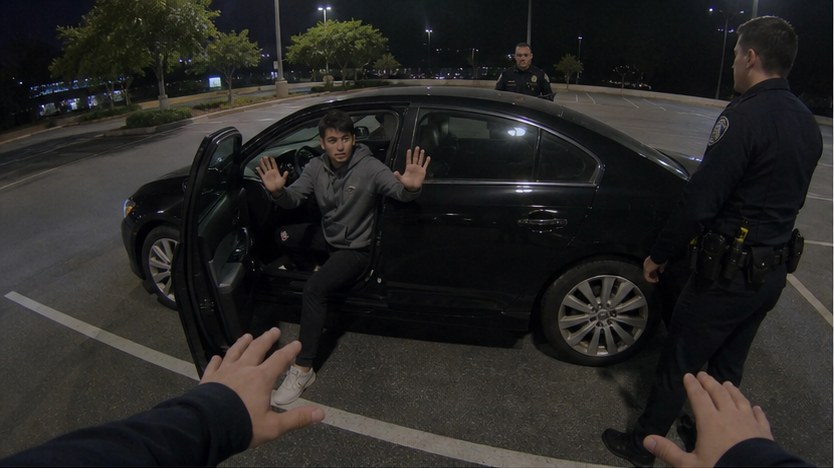 Officer Jones · Driver sideBoth hands visible
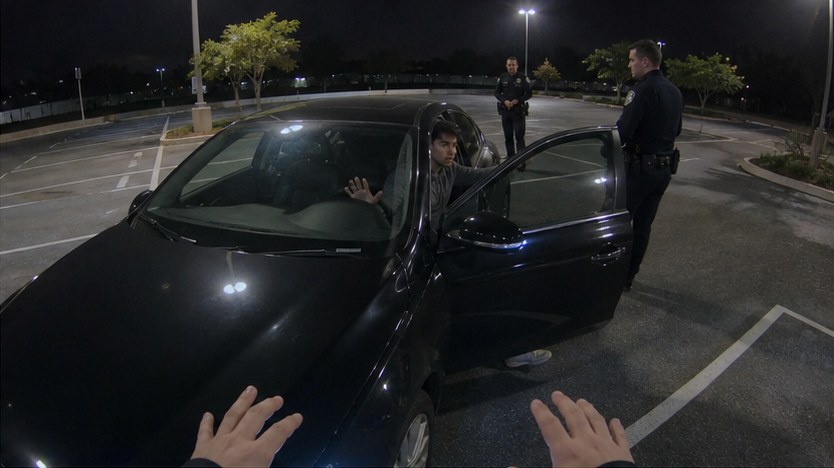 Officer Lee · Passenger sideDoor-frame angle
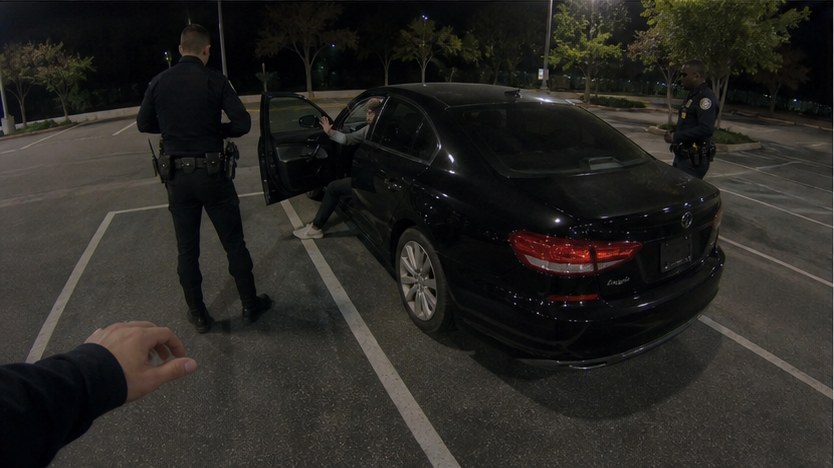 Officer Patel · Rear quarterOfficer positions
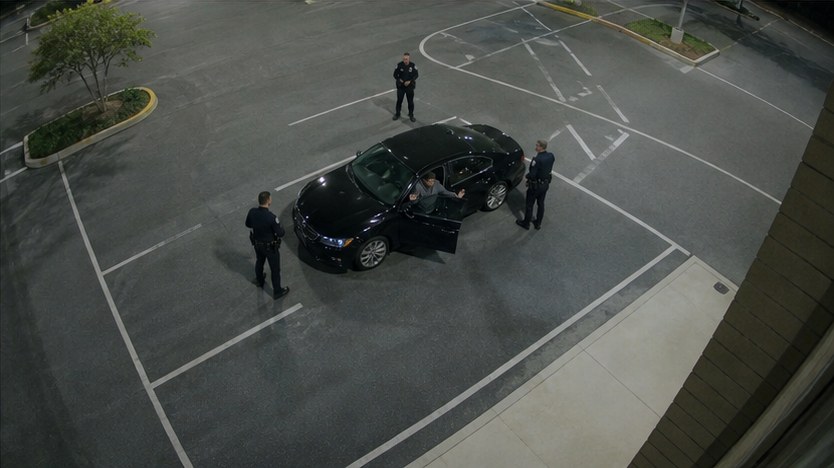 Fixed CCTV · Building cornerFull scene
Playback speed is a tool, not a conclusion. Faster review may be appropriate for inactive transport or waiting periods when audio remains understandable. Return to normal speed for searches, force, consent, warnings, client and witness statements, officer discussions, camera activation changes, and any segment tied to a disputed claim.
Step 3: Build an audio, visual, and angle index
Transcribe the audio with speaker labels and timestamps, but do not stop at speech. Index visible events: who enters or leaves frame, where hands and objects can be seen, when a search begins, when an officer changes position, and when a camera loses the view.
This is where dense productions become searchable. A brief officer remark during a long drive can be surfaced alongside the exact timestamp. A visual event that no one narrates can be marked. The system should also preserve uncertainty: “object partially visible” is more reliable than an unsupported conclusion about what the object is.
Driver’s right hand is partially blocked by the officer’s arm.
Passenger-side angle preserves the exit sequence.
Shows officer and vehicle placement, but not the driver’s hands.
Bodycam audio is difficult. Wind, radios, distance, overlapping speech, and microphone placement can distort a transcript. Treat transcripts and visual labels as navigation layers. Before relying on a statement or observation, replay the source, confirm attribution, and review enough material before and after the moment to understand it.
Step 4: Test written claims against the video
Create a claims list from incident reports, probable-cause declarations, interviews, dispatch, medical records, and later testimony. For each material claim, link the camera and timestamp that supports it, conflicts with it, or does not resolve it.
Keep the categories precise. “The video does not show the object” is not the same as “the object was not present.” “No instruction is audible on this camera” is not the same as “no instruction was given.” The report should retain the written language, the audible statement, the visual observation, the relevant angles, and the surrounding sequence.
Possible inconsistency · counsel verifies
“The subject voluntarily exited the vehicle.”
“I am instructing you to leave the vehicle.”
Machine-surfaced inconsistencies are leads, not findings of fact. Counsel still decides whether the language is actually inconsistent, whether the difference is material, whether another angle resolves it, and how the source may be used under the governing evidentiary rules.
Step 5: Build a cited review record
The final work product should prove what was reviewed and make every important moment easy to reopen. For each selected segment, record the source file, start and end timestamps, relevant angle, exact audible language, visible event, surrounding context, potential significance, and verification status.
A practical cited record should answer six questions without reopening the entire production:
- Where is it? Name the original source and exact timestamp.
- What is audible? Preserve the words and speaker attribution.
- What is visible? Describe the observation without overstating certainty.
- Which angle matters? Identify supporting, conflicting, and obstructed views.
- Why might it matter? Connect the moment to a claim, element, motion, or examination topic.
- Who verified it? Record attorney or reviewer confirmation and any unresolved issue.
What to require from an AI video-review tool
- Full-production inventory. The system should show what was received, processed, missing, duplicated, or unreadable.
- Synchronized multi-camera playback. Overlapping views should share one timeline while preserving access to each original file.
- Audio and visual indexing. Search should cover statements and visible events, with uncertainty retained.
- Angle-aware analysis. The tool should distinguish what a camera reveals from what it cannot see.
- Report-to-video comparison. Written claims should link to supporting or conflicting video, not merely a generated summary.
- Direct source access. Every surfaced moment should open the original recording at the cited timestamp.
- Human verification. Counsel must be able to confirm, correct, dismiss, and document every material lead.
Advocate is designed around that source path. It connects case documents, calls, and video; keeps multiple cameras synchronized; indexes what was said and shown; compares written reports with the footage; and returns counsel to the underlying source for verification.
Frequently asked questions
Must the lead attorney personally watch every minute of every bodycam file?
There is no universal federal rule stated that way. The representation requires a reasonable investigation under the circumstances. A defensible workflow establishes supervised coverage of the relevant production, documents the review, and gives counsel full-context access to material segments before making strategic decisions.
How does synchronized multi-camera review save time?
It lets the reviewer follow one event across several aligned cameras rather than replaying the same period serially. Material moments should still be reopened camera by camera at full resolution and appropriate playback speed.
Can AI catch a subtle statement during a long transport?
Audio indexing can surface a brief statement inside a long recording, but noise, crosstalk, and speaker attribution can produce errors. The attorney should replay the original source and review the surrounding exchange before using it.
Can AI determine what happened when one camera is obstructed?
It can compare other synchronized angles and describe what each view shows. It should not fill a visual gap with an unsupported conclusion. A reliable report distinguishes confirmed observations, partial visibility, and unresolved facts.
What should a bodycam review log contain?
At minimum: source file, officer or device, timestamp, visible event, audible statement, relevant angle, context window, issue tag, reviewer, and verification status.
Sources
- Bureau of Justice Statistics, Local Police Departments: Personnel, 2020, Statistical Tables (79% body-worn-camera figure).
- ABA Criminal Justice Standards for the Defense Function, Standards 4-3.7 and 4-4.1 (Fourth Edition 2017). The standards describe themselves as aspirational and direct counsel to obtain and review relevant information, investigate, and evaluate prosecution evidence.
- Strickland v. Washington, 466 U.S. 668, 690–91 (1984) (official U.S. Reports PDF, Library of Congress).
- Wiggins v. Smith, 539 U.S. 510, 521–27 (2003) (official U.S. Reports PDF, Library of Congress).
- Rompilla v. Beard, 545 U.S. 374, 383–90 (2005) (official U.S. Reports PDF, Library of Congress).
- People v. Cyrus, 48 A.D.3d 150 (N.Y. App. Div. 2007) (official New York State Law Reporting Bureau opinion).
- Office of Justice Programs, The Evidentiary Value of Body-Worn Camera Footage.
From evidence to live testimony
See the whole case, while the moment still matters.
Advocate connects documents, calls, audio, video, and live testimony in one source-linked case record.
See Advocate live